
1. Category
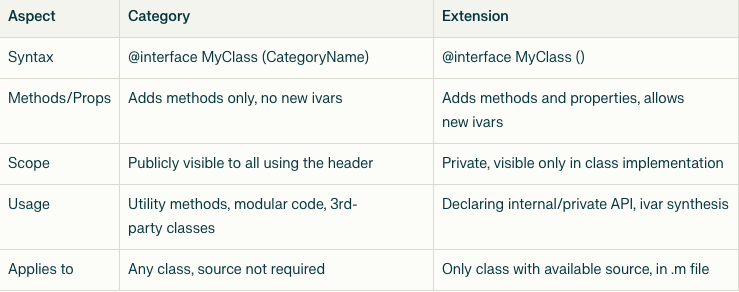
Category in Objective-C allows you to add new methods (instance and class methods) to an existing class, even if you don’t have the source code for that class.
Categories provide a powerful way to extend the behavior of system or third-party classes without subclassing or modifying their implementation.
You can use categories to keep related methods together, organize large classes, or add utility methods to built-in classes such as NSString, NSArray, etc
@interface NSString (Reverse)
- (NSString *)reverseString;
@end

@implementation NSString (Reverse)
- (NSString *)reverseString {
    NSMutableString *result = [NSMutableString string];
    for (NSInteger i = self.length - 1; i >= 0; i--) {
        [result appendFormat:@"%C", [self       characterAtIndex:i]];
    }
    return result;
}
@end
Usage:
NSString *str = @"Hello";
NSLog(@"%@", [str reverseString]);
// Output: olleH
2. Class Extension
- Class Extension is a special category with empty parentheses:
@interface NewClass ()
@end
Unlike categories, extensions:
- Can add private properties (with backing ivars).
- An extension (or class extension) in Objective-C is a special, unnamed category usually declared within a class’s implementation (.m) file.
- Extensions enable you to add private methods and properties (including backing instance variables) to a class. These members are only visible within the class implementation itself.
- Only classes for which you have the original source code can be extended in this way
// NewClass.h
@interface NewClass : NSObject
@property (nonatomic, strong) NSString *publicName;
- (void)publicMethod;
@end

// NewClass.m
@interface NewClass ()
@property (nonatomic, strong) NSString *privateName; //  Private property
- (void)privateMethod;                            // Private method
@end

@implementation NewClass
- (void)publicMethod {
    self.privateName = @"Hello"; // Accessible here
    [self privateMethod];
}
- (void)privateMethod {
    NSLog(@"Private method called");
}
@end
Important:
- Use class extensions to:
- Hide internal state of a class (private properties).
- Implement private helper methods not exposed to public API.
- Common in encapsulation and clean API design.
Diffrences: